5 Steps to Monitor Your Business Reputation Online in 2026
Someone searches your business name. One star lower than you remember. A sharp comment near the top. The phone stays quiet. That is the cost of not listening. A strong majority of shoppers now check online sources before they visit or buy, with Canadian consumers naming search engines, marketplaces, and review sites as their top pre‑purchase stops. If you don’t monitor business reputation online, you won’t see the missteps or the momentum. You’ll just feel the sales slip. See how that works? PwC Canada finds search engines top the list of pre‑purchase information sources for Canadians.
The good news? You can set up a simple system in under an hour, then keep it current in 15 minutes a week. No software degree. No agency retainer. This article lays out five clear steps that fit the schedule of a small business owner who already wears six hats. The thesis is simple: monitoring is essential to trust and engagement, and it’s easier than it looks. Strong brand monitoring habits turn scattered feedback into steady improvement.
Related: My TOP 5 CRM Software | Free vs Paid CRMs for Small Business — Stewart Gauld
1) Understanding the Importance of Online Reputation
When a customer searches “what people say about my business,” they’re really asking if you’re worth their time. They see your Google rating, a handful of recent reviews, and maybe a short burst of Facebook comments. That tiny slice of the internet becomes the whole story of your company in their mind. A few minutes of their research can tilt months of your work.
Here’s the surprising part: responding to reviews doesn’t just look professional, it can improve outcomes you can measure. Peer‑reviewed research showed that when hospitality businesses started replying to customer feedback, their ratings rose and review volume increased. Visibility improved because more reviews meant fresher signals for local search, which meant more buyers found them. That creates a flywheel. The data backs it up. See Marketing Science for details on a 0.12‑star ratings lift and a 12% increase in review volume for businesses that respond to reviews regularly (methodology based on multi‑platform hotel data). Source.
Now look at two real Canadian pressure points that make consistency non‑negotiable. In recent analyses from the Aurevon Intelligence Service (one focused on a Calgary custom metal fabricator and another on a Saskatoon sports‑bar concept), we found that (1) in saturated local markets where nearly everyone shows near‑perfect ratings, the battleground shifts to content visibility and proof of capability, and (2) diners want stronger value, clearer food‑safety signals, and better atmospheres at the same time. Translation: monitoring isn’t about firefighting, it’s about showing up where the decision happens and proving you still deserve it.
- Calgary’s custom metal fabrication scene is crowded with high scores, so the signal that separates competitors is often fresh, credible activity: up‑to‑date photos, timely responses, visible technology adoption, and local supply assurances. That changes how buyers shortlist.
- Saskatoon’s bar and family‑pizza operators face a “triple squeeze” of value, safety, and ambiance. If you aren’t tracking feedback across Google and Facebook each week, you’ll miss the cue that families now care more about kitchen transparency than happy‑hour specials.
What does this mean for you? Don’t chase a mythical perfect rating. Aim for current, candid, and active. Think of your reputation like a shop window on a busy street. A spotless pane matters, but traffic stops for what’s displayed inside and how often it changes.
Two cautions keep the window clear. First, fake‑looking patterns trigger skepticism and can break the law. The Competition Bureau has long warned businesses about deceptive practices tied to online reviews, including undisclosed employee posts and misleading testimonials. If staff comment publicly about your business, require them to disclose the relationship. Good monitoring will surface these problems early. Competition Bureau guidance. Second, build your system on channels your customers actually use. In Canada, that typically starts with Google, then shifts to a short list by industry. We’ll map that next.
If you want context on how the players around you shape these channels, bookmark these explainers for later: how to identify your real competitors, how to run a practical competitor SWOT, and how to track competitor pricing and marketing using public, no‑cost methods.
2) Simple Setup Tools for Monitoring
Let’s turn this from theory into something that pings your inbox when it matters. You’ll set up three light‑weight monitors, then add a calendar routine, so you can monitor business reputation online without extra software. If you are asking how to find out what people say about your business online, start here with reputation alerts, review monitoring, and light social listening.
Here’s how this actually works.
1) Google Alerts (2 minutes per query)
- Go to google.com/alerts while logged into your Google account.
- Create alerts for:
- Your business name in quotes: “North Shore Hvac Co” (replace with your name).
- Common misspellings and short forms.
- Your street address without unit number (helps catch directory updates).
- A top product or service plus your city, like “ductless heat pump Halifax”.
- Set “Sources: Automatic,” “How often: At most once a day,” “Language: English,” “Region: Canada,” and “Deliver to: your best inbox.”
- Tip: Add “-site:yourdomain.com” to exclude your own posts if they flood the results.
- Why it helps: Captures news mentions, blog posts, and forum threads that won’t appear in your review feed but still shape perception. This is simple mention tracking you can run for free.
2) Google Business Profile notifications (5 minutes)
- On desktop, search your business name while logged into the Google account that manages your profile.
- Click “Customers,” then “Reviews,” and enable notifications for new reviews and messages.
- Confirm your phone number for SMS alerts if offered.
- Under “Edit profile,” verify your business hours, categories, and service area are correct.
- Why it helps: Reviews and messages in Google often decide the first call. Speed matters here. PwC Canada highlights search and retailer sites as top pre‑purchase touchpoints.
3) Facebook Page alerts (5 minutes)
- Open your Facebook Page as an admin.
- Go to Settings > Notifications.
- Turn on alerts for “New reviews,” “Comments,” and “Messages.”
- If you use Instagram for DMs, enable the unified inbox so one login covers both.
- Why it helps: Many Canadian buyers still check Facebook for hours, photos, and community chatter. A quick acknowledgment here prevents a small comment from becoming a long thread.
Structure your alerts like concentric circles: reviews and messages are the inner circle, broader mentions the outer circle. Together, they catch most early signals.
💡 Pro Tip
Set a repeating reminder for 15 minutes each Monday, Wednesday, and Friday to clear your alerts. Consistency beats intensity.
If you’re mapping the competitive backdrop as you monitor, pair this workflow with short exercises: scan which categories competitors use on Google, save three of their best review replies, and add notes to your working document. Cross‑reference with your competitor SWOT template so insights don’t get lost.
3) Key Platforms to Check Based on Industry
Most owners get overwhelmed because they try to watch everything. Don’t. Watch where your buyers actually decide. Think of attention like a highway. You want the on‑ramps that feed your storefront, not every scenic route. Treat this as brand monitoring for small business, focused on the sites that move revenue.
For Canadian SMBs, start here:
- Restaurants and bars: Google, Yelp, TripAdvisor, Facebook. For nightlife or family dining, Facebook comments often hold the “vibe” cue that sways group decisions.
- Home and professional services: Google, HomeStars, Better Business Bureau (BBB), Facebook. In some trades, a single BBB complaint ranks on page one for months.
- Retail: Google and Facebook for local presence. If you sell specialty goods, add category‑specific forums or subreddits customers mention in reviews.
The right mix changes by city and competitive density. Consider the proprietary example above: where a local market is saturated with high scores, buyers skim for fresh proof (recent photos, “owner replied” badges, visible tech or local sourcing) to cut through sameness. When budgets tighten in places like Saskatoon’s dining scene, feedback on value and safety rises to the top. Both patterns came through in our March 2026 Intelligence Service work on a Calgary manufacturer and a Saskatoon bar. The lesson is simple: pick three platforms that move your customer’s decision and make them your “always” list.
Here’s a compact comparison you can use with your team.
| Industry | Key Platforms | Focus Areas |
|---|---|---|
| Restaurants & Bars | Google, Yelp, TripAdvisor, Facebook | Recent photos and menu accuracy; timely owner replies; cleanliness and safety cues; event or game‑day posts |
| Home & Professional Services | Google, HomeStars, BBB, Facebook | Service scope and licensing clarity; response to complaints; proof photos; scheduling and quote responsiveness |
| Retail (Local) | Google, Facebook | Hours and holiday updates; product availability; return policy clarity; reply speed on stock questions |
How do you prioritize within a category? The simplest rule: start with the platform that ranks highest for “[your business] + reviews” or “[your service] + your city.” Then ask two practical questions:
- Where do satisfied customers most often leave praise you can amplify?
- Where does a single negative post do the most damage if left unanswered?
What review sites should you monitor? Begin with Google and Facebook, then add Yelp, TripAdvisor, HomeStars, or BBB based on your category and city. Revisit this list each quarter as patterns shift.
Two quick examples make this concrete.
- Imagine a Halifax accounting firm. Before: the team peeks at Google once a month and assumes “no news is good news.” After: they check Google twice a week, reply to every review, and watch HomeStars monthly because local homeowners mention it in Google comments.
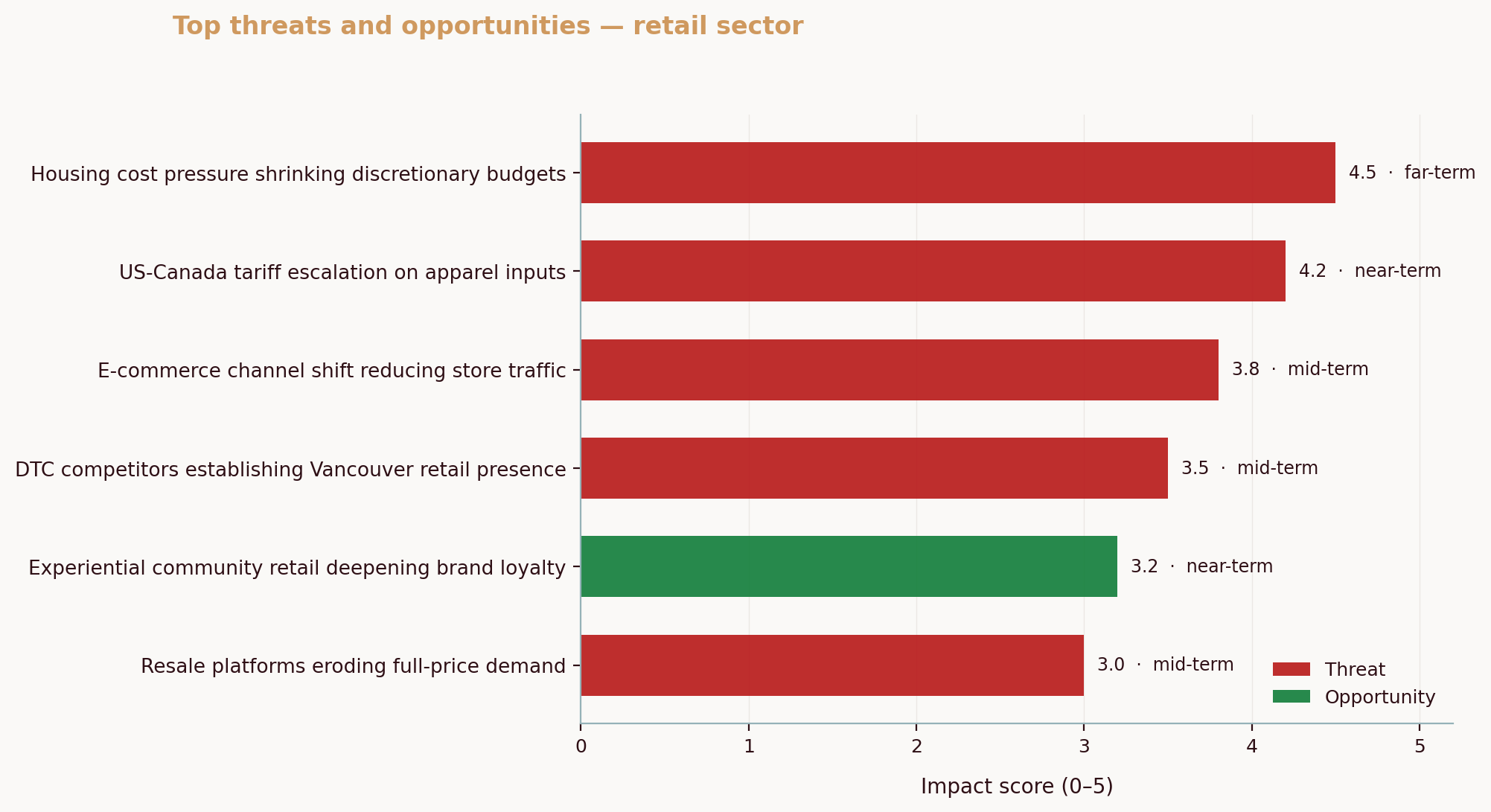
- Consider a Vancouver athletic‑wear retailer in a hot corridor. Their share of social mentions can erode as new brands arrive through influencer channels. Monitoring Facebook comments and Instagram DMs mid‑week, then logging questions about fit and returns, turns into a Saturday rack display that answers the top concern. That recovers foot traffic.
As you focus, build a research habit that supports your broader strategy. If you notice buyers comparing you against a competitor by name, that’s your signal to revisit who you’re truly up against and how you position. This short guide helps you reset that list: find your real competitors.
4) Weekly Routine for Monitoring Your Reputation
You only need 15 minutes three times a week to stay current. Treat it like brushing your teeth, a small habit that prevents big problems.
Monday: Google check (6 minutes)
- Open your Google Business Profile dashboard. Sort reviews by “Newest.”
- Reply to any review posted since last Wednesday. Thank positive reviewers with one specific detail. For negative comments, use a simple structure: thank, acknowledge, next step.
- Scan Questions & Answers for unanswered prompts. Add a crisp, factual response.
- Note any repeated themes (e.g., “parking confusion,” “slow Friday night service”) in a single running doc.
Wednesday: Industry‑specific scan (5 minutes)
- Restaurants: Yelp and TripAdvisor new reviews, confirm menu and hours match Google.
- Services: HomeStars and BBB updates, check for inbound quotes or complaint activity.
- Retail: Facebook comments on recent posts, answer product availability questions directly in the thread and via DM if needed.
- Add one screenshot of a representative review to your doc with a date stamp. This creates an internal timeline of what the public sees.
Friday: Social and brand mentions (4 minutes)
- Clear Facebook Page notifications.
- Search your business name and common short forms. If your name is generic, add your city to the query.
- For any off‑platform mentions you find (e.g., a forum or local subreddit), reply only if you can be specific and helpful. Otherwise, bring the theme back into your owned channels with a post or FAQ.
A few tips keep this efficient. Save three “reply templates” for common positives (“fast service,” “great staff,” “clean space”) and three for common negatives (“wait time,” “price concern,” “quality issue”). Customize each reply with one detail so it never sounds canned. Keep a one‑page crib sheet of facts that solve confusion: parking directions, return policy, busy‑hour tips. And once a month, translate your monitoring notes into one improvement you can ship, new signage, a clearer menu line, or a small process fix. That is how monitoring turns into momentum. Over time, this rhythm helps you track online reputation without letting it take over your week.
Want to layer in competitive context while you work? Spend one extra Friday each month scanning a rival’s best replies and ad copy, then drop observations into the free workflows here: track competitor pricing and marketing.
5) Responding to Negative Feedback
First rule: don’t panic. A heated reply satisfies a short‑term urge and creates a long‑term screenshot. Breathe, gather the facts, and choose clarity over combat.
Use a three‑part structure that keeps you professional and fast.
- Thank them for the signal: “Thank you for flagging the long wait at lunch today.”
- Acknowledge what happened, in plain language: “We were short two staff and didn’t pace the line well.”
- Offer a next step that matches the issue: “We’ve added Saturday coverage and would like to make this right. Please DM your visit time so we can follow up.”
That’s it. Keep names and private details out of public threads. Invite specifics to a private channel when needed, then return to close the loop publicly: “Thanks for connecting by DM, Jamie, glad we sorted the order mix‑up.”
Why this works: buyers read your response as much as the review. In research published in Marketing Science, businesses that started responding to reviews saw both higher ratings and more reviews afterward, a sign that engagement shifts how future customers participate. It’s not theory; it’s observable behavior. Study details.
Two quick “before/after” moments show the stakes.
- Before: “This is not accurate. We were busy.” After: “Thanks for the heads‑up about Friday’s delay. We didn’t pace orders well during the rush. We’ve changed the prep flow and added a second host during 5–7 p.m. If you’re open to it, message us so we can learn a bit more.”
- Before: no reply, then a defensive comment a week later. After: a same‑day acknowledgment, a private channel for resolution, and a short public follow‑up to show you closed the loop.
A final integrity note: never coach employees to post undisclosed positive reviews or to attack competitors. That erodes trust and, in Canada, can attract enforcement when reviews are misleading or connected to undisclosed relationships. If a staff member genuinely shares their experience, require disclosure so readers can weigh it properly. The Competition Bureau’s guidance on deceptive marketing spells this out clearly. Read the digest.
If you need a gut‑check on your approach, ask: would a reasonable person think this response is respectful, specific, and proportionate? If yes, post it. If not, edit until you can answer yes.
Common Questions About Monitoring Business Reputation Online
How often should I check my online reviews?
A weekly rhythm works best for most small teams. Split the work into short sessions: Monday for Google, Wednesday for the key review sites in your industry, and Friday for social mentions. This staggering prevents backlog, catches patterns earlier, and keeps your head clear. If you face a temporary spike, say a viral post or seasonal rush, add a short daily scan until the surge passes.
What should I do if I find negative reviews?
Reply promptly, thank the reviewer for the signal, and offer a next step that actually resolves the issue. Public responses are for acknowledgment and clarity, detailed troubleshooting belongs in private messages, email, or a call. When the issue is fixed, add a brief public note so onlookers see that you closed the loop. Over time, this approach pays off; rigorous research has linked management replies to modest ratings gains and more customer participation. Details here.
Is there a free way to monitor my business reputation?
Yes. You can monitor business reputation online with free tools: set up Google Alerts for brand and product terms, turn on Google Business Profile and Facebook notifications, and run a quick Friday search for new mentions. Start free, then add software only if volume or complexity justifies it.
Can I automate my reputation monitoring?
You can automate alerts and reminders, and you can template portions of your replies. What you shouldn’t automate is empathy. Set daily or weekly alerts for mentions and reviews, connect inbox notifications to the email you actually read, and keep three or four response templates for common situations. Then customize each reply with one concrete detail. That’s the human touch people trust.
Do this today
Set three alerts:
- “Your Business Name” in Google Alerts, once daily.
- New review notifications in your Google Business Profile.
- New review notifications on your Facebook Page.
Then block 15 minutes next Monday, Wednesday, and Friday for the checks. That small schedule change pays for itself in one rescued customer.
To deepen your instincts while you build the habit, keep these explainers handy: how to identify real competitors, run a competitor SWOT, and track competitor pricing and marketing. These tie what you hear in reviews to what you change in the business.
A final resource for your files: if you’re ever tempted to “massage” reviews, or you discover suspicious activity on your page, Canada’s enforcement guidance on deceptive marketing and online reviews is clear. It’s worth a five‑minute read so you can advise your team confidently. Competition Bureau digest. And for context on how central mobile access is to Canadians’ everyday internet use, see Statistics Canada’s 2022 update on digital access, useful when you’re deciding which channels to prioritize for replies. StatsCan CIUS 2022.
Ready to connect monitoring with market signals? If you want a single view of how competitors, local demand, and policy shifts are reshaping your category, Aurevon’s Ecosystem Dynamics Report can help you see beyond reviews to the forces moving your market. Book a short conversation to see if it fits your use case: https://aurevon.ca/.
Mitchell Ozmun
SMB Researcher, Business Analyst - Saskatchewan Born and Raised